Showing posts with label information security. Show all posts

Sunday, 17 April 2016

Incident Trends for Data Protection Breaches


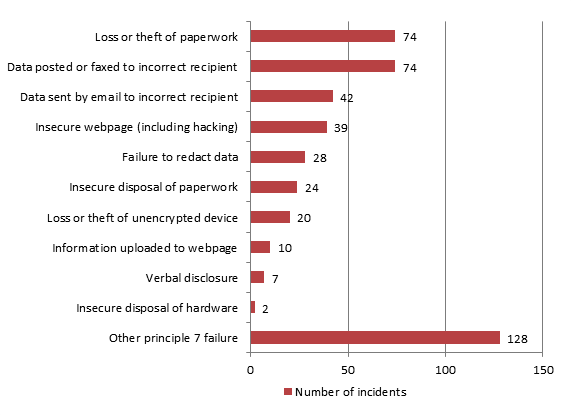
The Information Commissioners Office has published the list of ways in which personal data has been inadvertently disclosed over the last quarter. This is based on the information received by the ICO. There are undoubtedly a significant number of breaches which are never disclosed to the ICO but those that are show a definite trend.

The graph below is reproduced from the ICO website. Here's the link to the full page https://ico.org.uk/action-weve-taken/data-security-incident-trends/
 
Data security incidents by type
Top of the incidents reported is sending an email to the wrong person. Surprisingly this is followed by information being posted or faxed to the wrong person. In contrast, providing personal information verbally to the wrong person is quite low. Is this because we are more sceptical about providing information over the phone or in person to someone? The training provided by companies often focusses on this area and that may also be why this figure is so low.

The above list should be an indication to all organisations of the key areas where there is scope for losing personal information, so what steps do you have in place to make sure that information is not leaked or disclosed from your organisation in the same ways?

Sunday, 21 February 2016

9 cybersecurity fixes for businesses on a budget


For small businesses, a data breach can be expensive - it could even cost you your business. According to some studies, it’s been estimated that around half of companies are forced out of business within six months of a cyber breach.

One unfortunate trend that’s being picked up is that smaller businesses are increasingly becoming the targets of cybercrime - it’s not just major companies that are being held to ransom by hackers. It doesn’t help that a lot of smaller businesses rely on third-party services and growing amounts of computer equipment, both of which leave them ever more open to the threat of an attack.

It’s the big companies that make all the headlines, but this can be a factor in lulling smaller businesses into a false sense of security when in fact they are most at risk - more than 80 per cent of breaches are estimated to happen to small businesses. But with limited resources, how can you effectively secure your business against cyber threats?

Some of the solutions are obvious; for example 90 per cent of attacks can be avoided if a company uses basic measures such as firewalls, default passwords, VPNs and double authentication.  In addition, there are a few extra quick security fixes you can easily put in place to make sure everyone in the business does their bit to avoid a potentially devastating security breach.

1. Update your PC
Out of date software may not be supported or updated, leaving it open to threat. If you have any computers still running Windows XP, for example, get them upgraded - support and updates for Windows XP haven’t been available since last year!

2. Train your staff
Have a clear data protection policy in place and make sure everyone is clear about what they can and cannot store on their personal computers.

3. Keep sensitive data protected
Don’t use the same computer for storing sensitive data that you use for checking office email or surfing the web, keep a dedicated machine just for that purpose.

4. Review your stored information
Review the information that’s stored on your server(s) on a regular basis and make sure that confidential or financial data is properly protected.

5. Keep PCs well protected
Check that all your office PCs, laptops and tablets have automatic software and antivirus updates enabled and keep firewalls switched on.

6. Plan ahead
Put together a backup plan, which includes things such as who you need to call to arrange offsite backup if the worst happens, whether it’s hackers, a fire or flood, or physical theft of equipment. Keep a record of insurance policy details and what policies actually cover. 

7. Do your homework
Keep a close eye on computer logs and occasionally review them as they will prove valuable during an incident. Well maintained logs help you to understand what your computers normally do, which could help you spot hackers before they cause any damage.

8. Consider using a managed security service
Managed security services give you an extra layer of protection, and peace of mind that your business is as well-protected as a larger firm.

9. Support knowledge sharing
If we all share our actionable data on cyber breaches, it means that experts get an update on shared threats that exist. Knowing what’s out there gives the experts the opportunity to come up with an analytic approach to reflect the risk of cyber threats.

Do you have a security policy in place? If you’re unsure of how to protect your data, contact me and I will be delighted to provide you with guidance and advice.
Monday, 25 January 2016

Don’t leave your important information on the bus…


A school in York has been left red-faced after a member of the school staff left an unencrypted removable memory stick on public transport.

The Information Commissioners Office has launched an investigation after being made aware of the incident.  St Peter’s School in Clifton, which is one of York’s top public schools, admitted that there were a number of documents on the memory stick that related to school governance, and which could potentially include information about a ‘small number of individuals’ although thankfully there were no bank or financial details on the device. There was no suggestion that the information had been accessed or used by anyone since being lost in October.

The school's head, Leo Winkley, has also been forced to write to the parents of children at the school to inform them about the blunder, and is working with the ICO to make sure that all the correct procedures are followed - although it would have saved the school a great deal of trouble if they had simply encrypted their memory stick so that it was unusable without a password.
 
The loss has caused consternation in York as the device was said by a source to contain highly sensitive information about pupils and former pupils - and worryingly, the public transport operator has not been able to locate the missing memory stick - so nobody knows where it is, or whether it has been found by a member of the public and accessed.

A source told the York Press that they there had also been confusion with the ICO claiming to not know about the allegation, but after some investigation, subsequently confirmed that they were making enquiries into what had happened.

This case just underlines the necessity for all removable memory devices to be encrypted or password protected; with the best will in the world, memory sticks and other removable storage devices can go missing, but if the information is protected by a password, if it should be found by someone, the data will be protected from anyone unscrupulous using it.

Do you have a security policy in place and train your staff in how to protect sensitive information? If you’re unsure of how to protect your data, contact me and I will be delighted to provide you with guidance and advice.

Sunday, 20 December 2015

Data loss - the obvious ways your business can avoid it


The top reasons cited for data loss from small businesses aren’t international hacking or grand scale cybercrime -  they are obvious, easily rectified things that would have been avoidable with a little advance attention to detail, proper training and a staff data security policy.

According to surveys, a staggering more than 78 per cent of organisations worldwide report that they have suffered from one or more data breaches in just the last two years. If you want to avoid your business being affected by careless data loss, you need to make sure that all employees - including you - are fully aware of the risks.

Surprisingly, one of the top reasons businesses lose data is that many employees (and their managers) still don’t understand the importance of not opening unexpected or suspicious attachments or clicking links embedded in spam emails. Other basic measures such as leaving systems unattended, visiting restricted websites and not changing passwords regularly also led to critical business data becoming at risk from data-stealing cybercriminals and malicious insiders.

It’s estimated that cyber criminals steal as much as US$1 billion a year from SMEs in the US and Europe. This is partly down to inadequate or poorly enforced data security policies, leaving companies at a risk of losing vital and sensitive data, as well as costing money through lost productivity, revenue and of course, if the breach becomes public, the business reputation too.

Working from home and being able to take work out of the office makes working life easier but can be a nightmare for data security. With an estimated 56 per cent of employees reporting that they either very frequently or frequently stored sensitive data on their laptops, smartphones, tablets, and other mobile devices, the chances of confidential information getting lost or into the wrong hands are very high. Protecting data on mobile devices can be as simple as encrypting it and/or password protecting it - it won’t stop the devices being lost but IT admin will be able to selectively remove sensitive encrypted data and the chances of someone using it maliciously are much smaller if it’s not possible to get straight into any files that may be sensitive.

Do you back up your data on a regular basis or just when you remember? Regular backups are a vitally important part of a good data security policy, so make it a regular daily, weekly or at least regular task. Automate it if possible so that it doesn’t get missed. Without an automated backup and recovery strategy in place, your business may well be devastated if the worst happens, and if you want to avoid unnecessary downtime, loss of revenue and more in the event of a serious incident, you need a contingency plan in place at all times.

Lastly - even if you have a top notch data security policy, it’s of no use unless you enforce it.
If you need advice on up to date data security procedures and policies that keep your sensitive data safe, or want to know more about staff training, contact me and I will be delighted to provide you with guidance and advice.